Showing posts with label pokemon event. Show all posts

Friday, 29 April 2016

Pokemon Scrap Event 2016 Course B Update

Course B for the #Pokemon Scrap Code event has started! The registration site is the same, so you can use the same log in that you made for Course A. You can see my instructions for course A here.

Be very sure that you are registering the scrap codes for the correct course!!

This is what the scrap code registration page looks like now with the two courses. Double check that you are on the right course before you register your codes!

Friday, 11 March 2016

How to donate to Pokemon With You 2016

From March 11th to March 31st 2016, you can donate to the Pokemon With You campaign to provide aid to those affected by the Tohoku earthquake. When you donate, you will get a pikachu code to redeem in Japanese ORAS/XY. The code is redeemable from March 11th to April 21st. You can only get one code per account.

What you will need: a Japanese credit card (Visa, Mastercard, JCB or Yahoo) or bank account to make the donation.

To start, you need to make a Yahoo! Japan account and then set up a Yahoo! Wallet for payment. You can get there from the home page of the Pokemon With You project page.

Sign up for an account by clicking on the link near the top of the page.

Create a new account by typing in the details here. You can get a postal code using Google :) For typing Japanese, you can copy & paste the hiragana characters from Wikipedia.

Confirm the account details.

Check your email and click on the link inside.

You should see this message for a successful registration. Click on the link down the bottom to register payment option.

Fill in your details here. You can get an address using Google Maps :) This shows how to register with a credit card but you can also register with your bank account.

You should see something like this if your registration was successful.

Head back to the Pokemon With You page and click on the yellow donation button. You should see this page to start the donation process. Click on the yellow button to continue.

Choose your donation amount here. The default is 500 yen but you can choose much higher than that :)

Confirm the amount that you wish to donate and your credit card details.

You should see something like this if your donation was successful. Click on the highlighted link to go back to the Pokemon With You project page.

If you have donated, the page should show you the Pikachu serial code on the right.
As you can see, there have already been many donations made. Hopefully this guide can help some people to make a contribution also :)

Tuesday, 1 March 2016

How to Redeem Scrap Codes 2016 Version

This is an updated guide from the Pokemon scrap code event from last year, covering the A Course (B Course will be up when that is released - updated post here). To be honest, it's basically the same procedure but I wanted to cover all my bases so here we go.

The A Course scrap event runs from Mar 1st 2016 to Aug 31st 2016 where you can get a Shiny Mew (1 code), Articuno (4 codes), Zapdos (12 codes) and Moltres (16 codes). Like always, the in-game codes are only redeemable in a Japanese XY/ORAS. The in-game codes are given when you register the scrap codes online. The scrap codes come with certain merchandise on sale in Japan; scrap codes and in-game codes are different!

To register the scrap codes, start off by registering for an account on the 2016 Pokemon Scrap website. Tick the square to agree to the terms and conditions, and then click the Red button on the left.

The blue box is for logging into your account if you have already made one.

Type in your email twice, press the Red button and check your email for something from info@pokescrap2016.pokemon.co.jp.

Make sure you use a working e-mail because you're going to need to check it.

Click on the long link in the email to confirm your email address, and in the subsequent web page, type in a password twice to set up your account.

Check your spam or bin if it isn't in your inbox. It is sent basically instantly.

The link in the email will prompt you to set up a password for your account.

You'll be presented with a survey. In order:

  1. your age (in years)
  2. your gender (male=left, female=right)
  3. which part of Japan you live in (東京 is Tokyo if you're interested)
  4. how did you hear about this campaign (インターネットのホームページ is internet website, or 友達から聞いて is friend, or you could even pick その他 for other)
  5. which merchandise did you buy for the code (probably anything is fine)
  6. which Pokemon games do you have (『ポケットモンスター X・Y』と『ポケットモンスター オメガルビー・アルファサファイア』を両方持っている means you have XY and ORAS, like a true fan!).

You wouldn't pick one of the last 3 options for Q6. would you?

 Click the Red button to send the information through, and then confirm your details.

There's a lot of clicking red buttons.

Once you click this Red button, you will be able to register your scrap codes.

Like this larger red button.
  Like the previous year, the scrap code input is at the bottom of the page.

The submit button does not appear until you check the box!

To see the in-game codes, click on the プレゼントを確認する in one of the top yellow boxes (or you can just use this link).

The red button under each Pokemon/item will take you to the page with the in-game code.

So this button will give me the Eevee code.

And of course, there's another red button :)
The code will also be sent to your email if you decide not to redeem the code right away.

Remember to register your scrap codes and redeem the Pokemon codes in time before they expire!

Tuesday, 16 February 2016

How to purchase from Pokemon Center Online Store Japan

#Pikachu with Fly Surf Agility Celebrate is distributed with the first purchase from the #Pokemon Center online store (JPN) from 16th Feb 2016 to 22nd May 2016, redeemable from 16th Feb 2016 to 31st Aug 2016 Japanese ORAS only.

Of course, that means you need to sign up with them first...

What are you willing to do for him?

To create an account and make a purchase, you will need a credit card (VISA, MasterCard, JCB, Diners Club, American Express - foreign credit cards work too), an address in Japan and the ability to input Japanese text to fill out the forms (Win/Mac).

The code is posted to you with your purchased item so it is very important that you are able to receive the item that you buy in order to get the Pikachu code.

If you have a friend or acquaintance in Japan who agrees to forward your goodies to you, then you are set. Otherwise, (and this will incur additional fees) there are mail forwarding services who will provide you with a Japanese address which your order will be sent to, and then the package will be forwarded onto your real address outside of Japan. Some services are better than others so be careful! Make sure the Pokemon Center Online Store will ship to the forwarding address.

Once ready, go to https://www.pokemoncenter-online.com/ to start.

Click the button in the top right corner to make an account and then fill in your email in the box on the right.
Confirm your email and submit to send a confirmation email.

Check your inbox/spam/bin for this email and click on the link inside.

Fill in your details. #1 #2 should be in Japanese. Filling in #5 should automatically fill #6 #7. #8 #9 will depend on your address. Numbers and passwords should be alphanumeric. If you are using a forwarding service, check their FAQ for their shipping address instructions.

Confirm your details that you filled in previously, and submit.
You can now log in with your email and password (use the same upper right corner button, and this time fill in the box on the left), and add items to your cart.

The cheapest item is probably an old TCG pack.

Once you add an item to your cart, scroll down to confirm purchase.

Here you should see your details you registered with previously. Click the red button to continue.

Enter your payment details here and then click the red button to continue.

Cheapest purchase is a total of 702 yen including tax and shipping. Confirm your order one last time!
And that's it! Remember that purchases under 5000yen have a domestic shipping fee, as you can see in the picture above. They have lowered it to 3000yen as a special service for the opening of the store so make use of it while you can!

The Pikachu event code is being distributed in a "as long as stocks last" basis so if you leave it too late, you may miss out. Just to reiterate: the code is posted on a post card with the item so you need to provide a working postal address to receive it.

The Pikachu event aside, the Pokemon Center has a lot of awesome Pokemon merchandise. Since pretty much all Pokemon Center merchandise are limited edition items, once they are gone, they are usually gone for good bar the occasional re-release. Personally, I also feel that almost all Pokemon Center exclusive items are well made, with plush toys feeling much nicer than the ones from Takara Tomy or Bandai for example. I think it is well-worth setting this up if you plan on making future purchases, especially since this store has a point system unlike the physical stores :)


Sunday, 31 January 2016

Make a purchase on Japanese 3DS e-shop

In order to purchase the #Pokemon virtual console games for the VC #Mew event on your Japanese 3DS, you will need to add credit to your account using your 3DS either by prepaid card or credit card.

If you have already set up your Nintendo Network ID on your 3DS, the purchase part is pretty easy.

Please check that you can access your Nintendo Account here or you will have trouble getting to your code!

In the 3DS e-shop (shopping bag icon on Home Screen), scroll left until you see the icon for adding payment (credit card icon).

Left to right, top to bottom: if you use a prepaid card, you only have to enter the prepaid card number but if you pay by credit card, you need to choose how much credit to put on, choose your credit card company and enter your credit card details. Accepted credit cards are JCB, Mastercard and Visa. You'll be asked if you want the save the credit card details (the left button is no), and then to confirm the credit purchase (the right button is yes).

Once there is credit in your account, you should be able to see your balance at the bottom of the top screen (in the images, you can see I have 500 yen).

Then it is as easy as going back to the front of the e-shop and selecting the Pokemon virtual console games. You can tell which game it is from the image in the top screen but just in case, the games from left to right are, red, green, blue and yellow.

The button for "continue", "next" and "agree" is usually the one on the right, or in orange.

Here is the Pokemon Virtual Console in the e-shop as of Feb 1st 2015.

The games are downloadable and the Mew code is redeemable from Feb 27th to Mar 31st. The VC Mew code is obtainable after purchasing any of the VC games. The code will be shown to you on the receipt after the purchase of the VC game (see here in your transactions).

You can also click the My Transactions link in the red box after you login to your Nintendo account.

Click on your purchase. On the next page, the serial code will be under the text
《シリアルコードはこちら》

To clarify:

There are 3 Virtual Console items/merchandise for sale, for each Red, Blue, Green and Yellow VC game.

  • The VC game that you buy from the e-shop from your 3DS or an in-store download card in Japan, for 1,200 yen (shown above)
  • A physical package which includes a code to download the game as well as some other goodies like stickers, magnet and a map for 1,500 yen
  • The 2DS bundle which comes with the VC game pre-loaded on a 2DS with a Mew for the VC game as well as other physical goodies for 10,777 yen.

All 4 Virtual Console items include the Mew code for XY/ORAS (the physical package and 2DS bundle will be a physical card with the code).

Each download of each GAME (R/B/G/Y) comes with the Mew code, so you could buy all 4 VC games for 4 codes.

Make a Japanese Nintendo Account and link it with your 3DS

In anticipation of the #Pokemon Red/Blue/Green/Yellow re-release with the #Mew event code, I've included a few instructions for those with a Japanese 3DS who are interested in trying to get this for themselves.

This part can be a bit tricky and I'll be happy to help you out if you get stuck via Facebook. Please make sure to send me a screen shot or photo of the step you got up to so I can figure out what happened.

Please note that the Mew code event from this Virtual Console package is only attainable from 27th Feb 2016 to 28th Feb 2017 and is redeemable from 27th Feb 2016 to 31st Mar 2017.

Also I do apologise for the potato quality :)

Before you start, you need to make sure your 3DS can be connected to the internet (although the text will be in Japanese and not in English, but the buttons are basically in the same place/same color so follow the English instructions there), that your system is up-to-date (it should try to download updates once you have connection to the internet) and that you have a Mii set up.

To set up a Mii: from the home screen, find the Mii icon and it will prompt you to make a Mii. Press next (次へ), then OK, select Start from Scratch (はじめからつくる), select gender, customize Mii if you like and click next (次へ) down the bottom, fill in a name and click next (次へ) down the bottom.


If you have all that ready, then you can start registering for a Nintendo Network ID using the image below. If you already have a Nintendo Network ID, in the last image, select the top option instead and it will ask for your Nintendo Network ID and password to log in.

Read from left to right, top to bottom. For making a net Nintendo Network ID from scratch, choose the bottom option in the last image.

Press the buttons as indicated below until you get to the page where you input your details (the three drop-down boxes).

From the top to bottom, left to right: date of birth (year, month, day), gender (boy, girl), Nintendo Network ID ie username, Nintendo Network ID password, confirm password, your working email address, retype email address.

Do not reuse an email that you have already used for a previous Nintendo Account. Just to be safe, use a completely new email that you have not used with Nintendo before (any region).

Read from left to right, top to bottom. When you get around to filling your personal details, they are: date of birth (year, month, day), gender (boy, girl), Nintendo Network ID ie username, Nintendo Network ID password, confirm password, your working email address, retype email address.

An email will be sent to your email address with an activation link. It may end up in your spam folder so check both inbox and spam/trash.

Click on the link to activate your account.

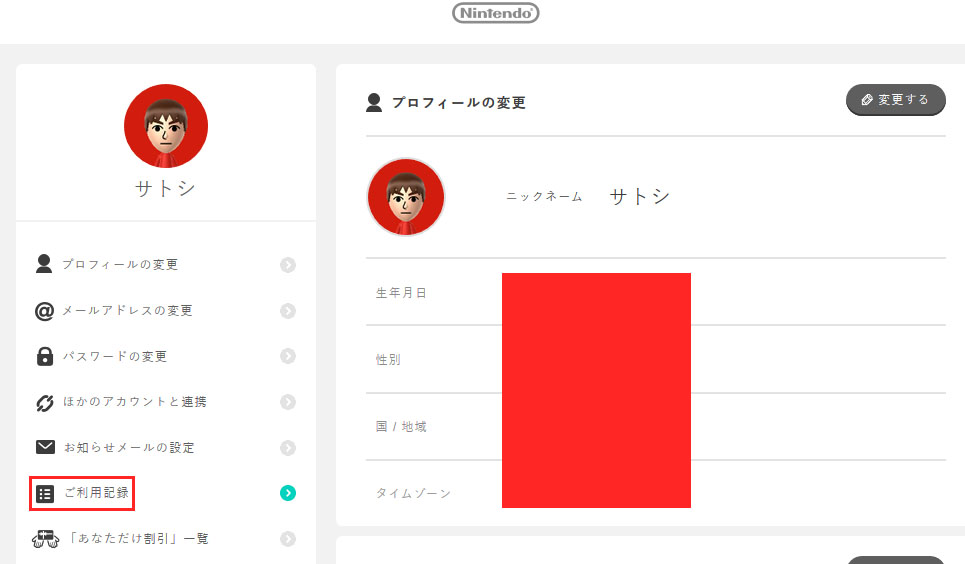
Go to the Nintendo website to log in. It took about 5 minutes for my account to activate properly so it would recognize me.

You should then be shown your details like your name, birthday etc, that you entered previously.

I've blanked out my details but you should see yours in those white boxes. Check the second box to agree to terms and conditions and click the blue button to proceed.

 You will then be sent another confirmation code to your email. The email will contain a 4 number code that is present in the email subject. Again, check your spam/trash just in case.

Enter the 4 number code where the dashes are and then press the blue button.

If you are successful, you should be shown your details on the account page. Otherwise, try to log in either using your email and password, or using your Nintendo Network ID and password.

If you are unable to log in but you are fairy sure that the email you signed up with is correct, you can try to reset your password and log in that way.

The next step is to make the purchase in the shop.

Saturday, 24 January 2015

World Hobby Fair Tokyo 2015: Pokemon Shiny Rayquaza Event

Back from World Hobby Fair with shiny #Pokemon #Rayquaza and a bunch of photos. I can't wait to have a rest tomorrow!

It was at one of my favorite convention places, Makuhari Messe all the way out in Chiba. Despite it being a two day event, it was really busy with heaps of families and little kids running running around.

Personally I think it should have been the Kids Hobby Fair because most of the booths and events were kid oriented. Also, no freebies for adults, just kids D:

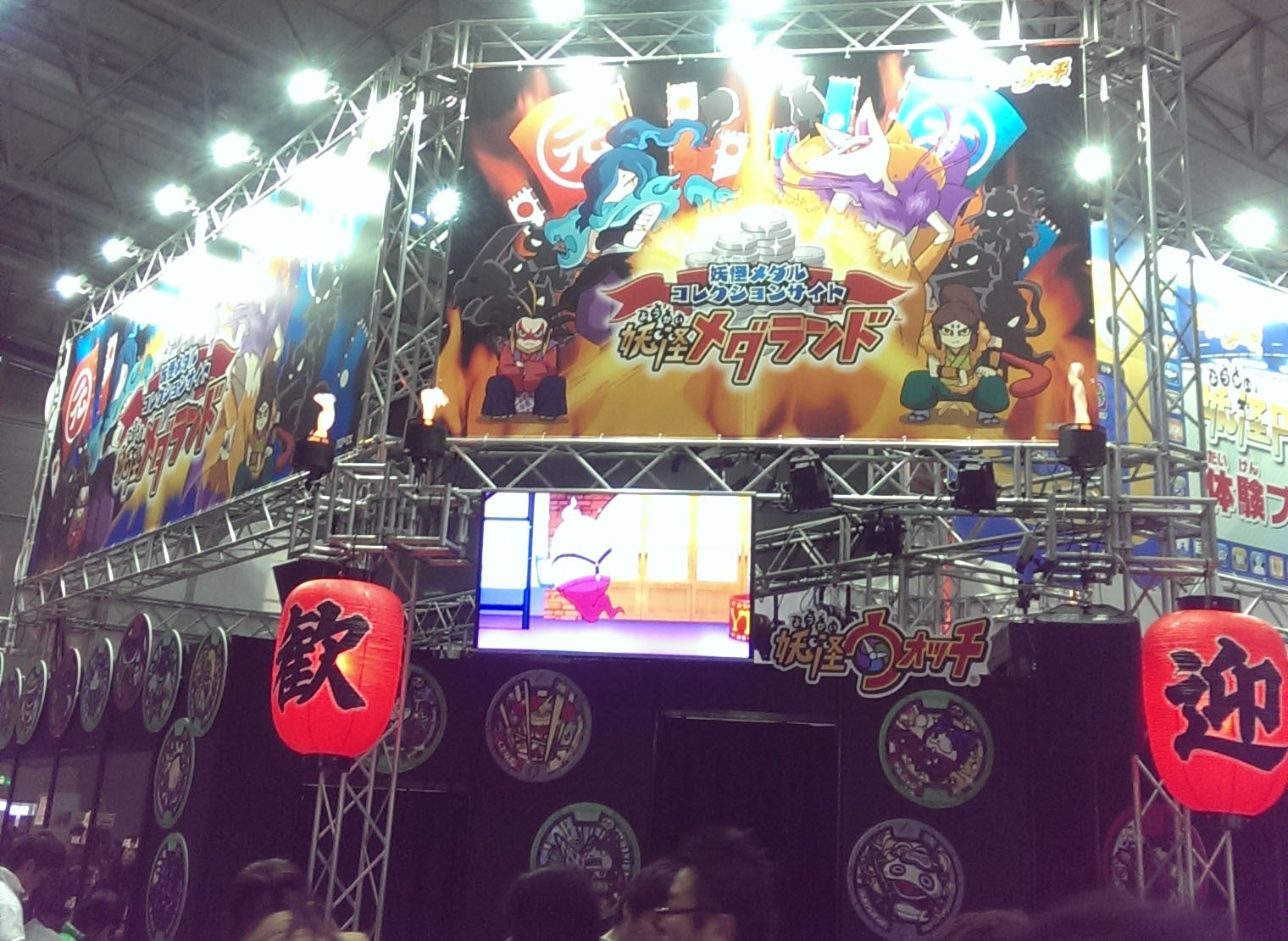
Most of the event hall was dedicated to Yokai Watch. They even had the artists perform the songs on a stage so I had the second opening stuck in my head. Say what you want about it but it's very catchy.

Yokai Watch here...
there...
here too...
...mostly everywhere.
 But there were other things around too. Unfortunately most demos or events had some spectacular queues when I was there.

Gundam Build Fighters
Wii U
PS Vita Minecraft
I mainly went for Pokemon which got one big booth and some merchandise strewn about. The life-sized pikachu seem to be regulars at these kinds of events now.

Slightly creepy close-up but adorable from afar.
The whole gang together. The staff were very nice and did cute poses with the kids.
The plastic figurines they've been releasing lately. I had my doubts about the shiny charizard so it was good to see it up close.
Current Crane King prizes. Saw them at a close Sega afterwards.

More Crane King prizes.
Upcoming Goomy prizes. They actually look a lot better than the photo.
Metal carry cases. I really like the Gengar/Dusknoir one.
A small crane game machine replica.
The Pokemon Life @ Room Crane King series currently available. The weight of the plates make it much too hard for me.
Over all it was pretty fun. It just would have been more fun if I was a kid and got free stuff. I may be a bit miffed from not being able to get the Gundam Build Fighters kit sets.

If you requested a rayquaza from me, I will be in touch with you shortly regarding photo proofs and trading.